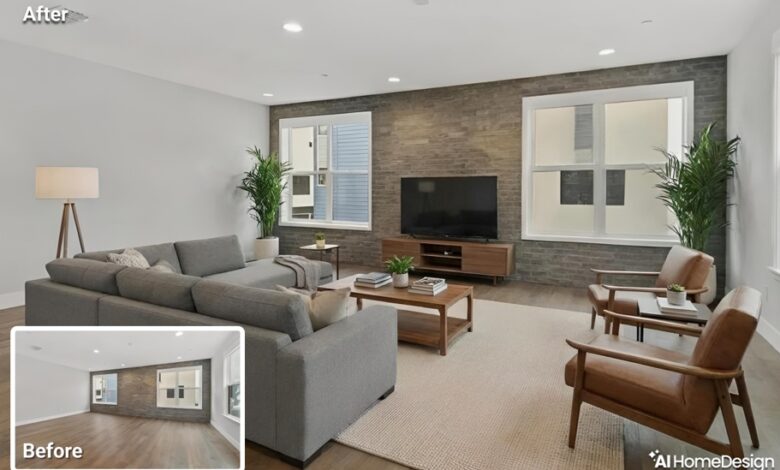
AI staging has settled into everyday listing work. Teams no longer debate whether to stage. They spend more time wondering about how to stage without creating gaps between what buyers see online and what they encounter in person.
Many brokerages already rely on online virtual staging as part of digital listing presentation. That shift has changed expectations. Buyers now scan visuals closely, compare images across platforms, and form opinions long before they step into the property. However, when visuals overpromise or vary across channels, trust erodes quickly.
To prevent that trust drop, the strongest teams no longer treat staging as a creative one-off. They treat it as a listing standard with rules, review steps, and clear disclosure. That structure protects credibility while keeping visuals persuasive.
The Real Risk Isn’t AI. It’s Uncontrolled Variation.
Most misleading listings do not start with intent to deceive. They start with small, unreviewed decisions. One image gets adjusted differently from another, a designer fills a room based on taste rather than proportion and a staged set reaches social channels without the same labels used in the MLS.
These gaps add up quickly and buyers assume manipulation when images do not match across platforms. Only then, when complaints surface, agents begin to rest expectations during showings!
None of this comes from the staging tool itself. As far as AI staging for real estate is concerned, teams run into trouble when they stage without shared rules and review steps. A reliable process prevents this drift before it reaches the public.
Guardrails First: What You Must Never Change in a Staged Image
Before any staging begins, teams need fixed boundaries, and most MLSs expect the same discipline across edited listing visuals. AI staging for real estate only stays buyer-safe when teams treat these boundaries as fixedThese guardrails define where visualization ends and misrepresentation begins.
- Structural layout
Walls, openings, room connections, and circulation paths must remain accurate. - Windows and doors
Count, size, placement, and orientation must stay intact. - Ceiling height and architectural volume
Vertical space sets buyer expectations and cannot shift through visuals. - Views and light direction
Exterior context and daylight direction must reflect reality. - Material condition or visible damage
Staging should not remove issues such as water stains, wall cracks, or damaged flooring that buyers will see in person. - Room proportions through furniture scale
Furniture size must match the room’s dimensions to avoid exaggeration.
When the visuals stay honest, buyers arrive focused on the property, not on what looks different from the photos. Therefore, sticking to these rules reduces expectation gaps that force agents to spend time defending the visuals instead of selling the home.
Buyer-Safe QA Checklist Before Anything Goes Live

Guardrails only work when teams enforce them through review. A short, repeatable checklist catches most problems before publication. Most issues show up in the same places every time: scale, lighting logic, and missing labels. A checklist forces a deliberate look at those points on every listing.
A practical QA flow includes:
- Start with clean originals
Review the untouched images first. Know what the property actually shows. - Lock non-editable elements
Identify structural and permanent features before staging begins. - Check furniture scale against geometry
Compare furniture size to doorways, windows, and circulation space. - Review shadows and reflections
Confirm contact points and lighting behavior make sense in the room. - Confirm lighting logic
Light sources should match the space and time of day shown. - Compare staged images to originals side by side
Look for shifts in proportion, perspective, or condition. - Confirm disclosure and labeling presence
Every staged image should carry the proper notice. - Verify version naming and storage
Originals and staged sets must remain easy to trace. - Run a channel cross-check
Confirm the same images and labels appear everywhere.
Teams that use ai staging for real estate within this type of checklist treat it as part of a controlled workflow rather than a creative shortcut.
Where Disclosure Lives and Why Placement Matters
Disclosure works best when it feels normal and predictable. Buyers react poorly when labels appear in one place and disappear in another.
Clear placement keeps disclosure visible without overpowering the listing. Many online virtual staging workflows add an on-image mark like “virtually staged” so buyers can identify staged photos at a glance. Principled teams usually maintain disclosure in:
- MLS remarks
Buyers expect detail here. Disclosure belongs where property facts already live. - Image captions or labels
Visual context helps buyers interpret staged images correctly. - Listing descriptions
A brief note reinforces transparency during deeper review. - Portals and syndicated feeds
Third-party platforms should reflect the same information. - Social posts and ads
Visual-first channels still need clarity, even in short formats.
The goal stays simple. Buyers should never wonder whether a photo reflects reality or visualization. That clarity keeps attention on the home, not on what might have changed in the image.
A Simple Brokerage Workflow That Prevents Errors
Each role focuses on a specific check rather than assuming someone else handled it. This prevents the two most common gaps: nobody verifying realism, and nobody confirming disclosure before publishing. It also records who approved what, in case questions come up after the listing goes live
A typical brokerage workflow looks like this:
- Marketing manager or designer
Prepares staged images within defined guardrails. - Listing coordinator
Confirms visuals match property details and listing facts. - Listing agent
Reviews realism from a buyer’s perspective. - Compliance or operations lead
Approves the final set before publishing.
Alongside roles, teams maintain defined asset handling:
- Store originals and staged images separately
- Apply version names that show status and approval
- Publish only from the approved folder
This structure keeps last-minute changes from slipping through unchecked.
How Listings Become Misleading by Accident
Problems often appear small at first. A sofa feels slightly large, a shadow looks off, or a wall blemish disappears in one image but remains in another.
These details matter because buyers notice them even when agents do not. When images differ across platforms, buyers assume something changed on purpose. And that means buyer trust drops quickly.
These issues often slip through because no one owns the final review. A short checklist plus a documented approval step catches them before publication. That last pass should confirm realism, disclosure placement, and the exact asset set that will ship to every channel.
Channel Uniformity Is Where Trust Holds or Breaks
Buyers rarely see listings in one place. They jump between the MLS, portals, and social feeds. When each surface shows a different version, confidence weakens.
Teams that maintain one approved image set avoid this problem. The same visuals and labels follow the listing everywhere. Buyers know what they are looking at and agents spend less time correcting assumptions. Uniform publishing protects credibility more than any single image ever could.
Treat AI Staging as a Listing Standard, Not a Creative Choice
Online virtual staging works best as a presentation layer. It helps buyers understand how a space could function and it’s not meant to rewrite the property.
Teams that apply guardrails, review steps, and disclosure treat staging like any other listing requirement. The result then feels clear, honest, and reliable.
When visuals support decision-making instead of reshaping reality, buyers arrive informed, showings run smoother, and conversations stay focused on value rather than explanation.
Responsible staging is not a tactic. It is a standard that protects trust across every listing surface.